GCP Memorystore HA 高可用性 failover 測試
此文章主要針對 GCP Memorystore failover 來做測試,測試 Memorystore 高可用性 (HA) 在標準 Standard Tier failover 故障轉移需要多久,以及不同 replica 條件下轉移是否會有差異等等。
文件說明
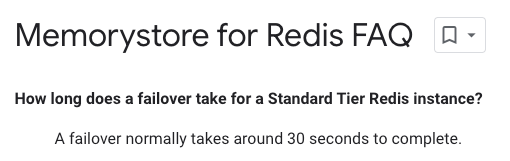
首先我們可以先閱讀 Google Memorystore for Redis FAQ 文章,可以得知 Standard Tier 在 failover 轉移,大約會花 30 秒左右。
我們也可以從 High availability for Memorystore for Redis 文章中知道,當 Primary 資料庫發生故障時,就會發生故障轉移。在轉移期間,Primary Endpoint 和 Read Endpoint 會自動重新導向新的 Primary 資料庫 和 Replica。這時候 Primary Endpoint 和 Read Endpoint 連線都會被刪除。

因次會導致有幾秒鐘連不到 Redis。重新連接時,將使用原本的 IP 位址即可自動重新定向到新的服務上。故障轉移後,不需要調整連線設定。
接下來我們來實際測試看看,我們分成兩個測試組,分別為:1m1s、1m2s 的方式,來看看故障轉移時,需要花多久,還有不同 Replica 條件下會不會有差異。
實作測試 (1m1s)
可以只用之前 IaC 文章來建立,或是用 UI 來建立 Memorystore,這邊用 IaC 來示範:
terraform {
  source = "${get_path_to_repo_root()}/modules/memorystore"
}

include {
  path = find_in_parent_folders()
}

inputs = {
  name           = "ian-1m1s"
  memory_size_gb = 5
  region         = "asia-east1"
  network        = "bbin-XXX"
  replica_count  = 1
  redis_version = "REDIS_6_X"
  redis_configs = {
    "maxmemory-policy" = "allkeys-lru"
  }
}
這邊 memorystore module 預設是 Standard Tier,另外小提醒,如果要使用 Replica memory_size_gb 最小必須是 5G。
設定監控
建立完成後,我們也先把監控給拉出來,設定可以參考 About manual failover,主要是選擇 Cloud Memorystore Redis > replication > Node role
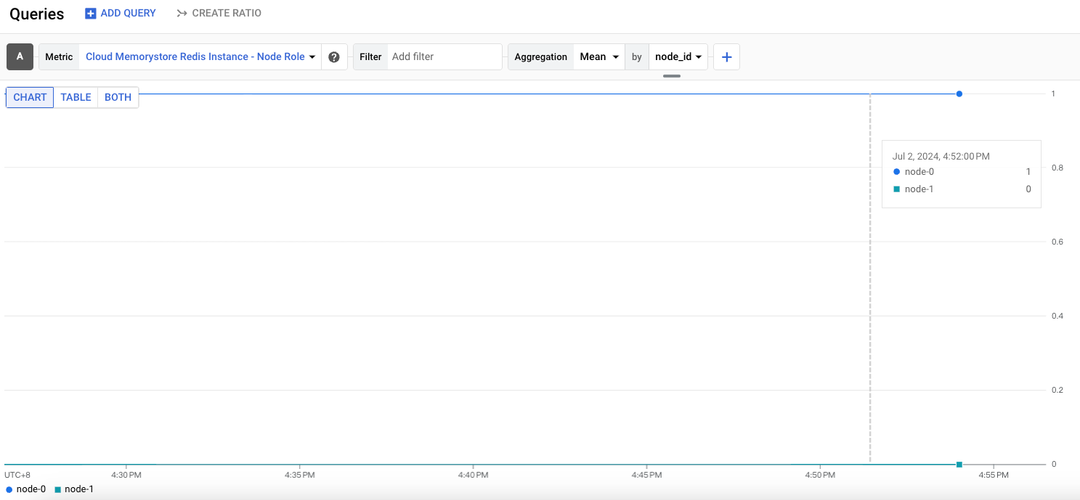
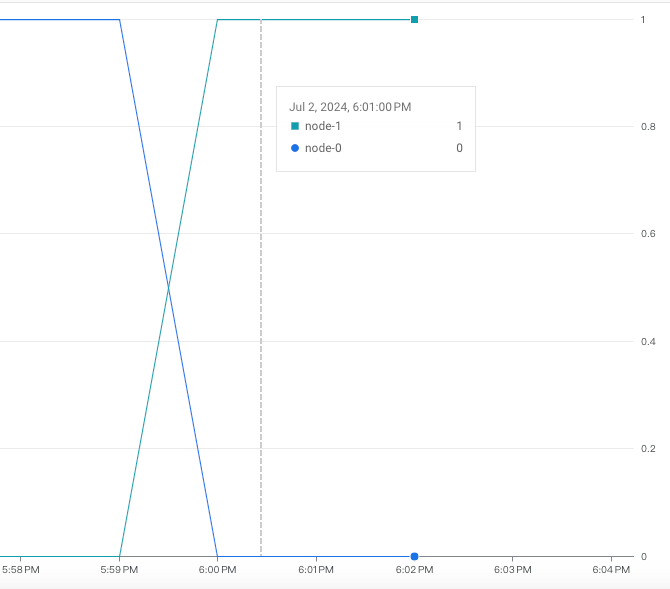
可以看到 node-0 跟 node-1,數字 1 代表 Primary (node-0)、數字 0 代表 Replica (node-1)
查看 describe
我們也可以下指令查看:
gcloud redis instances describe ian-1m1s --region=asia-east1 --project={project_id}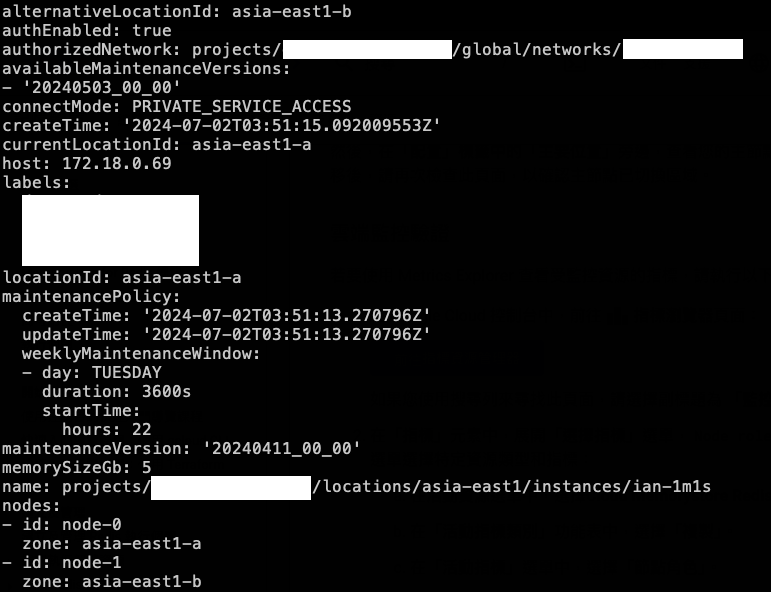
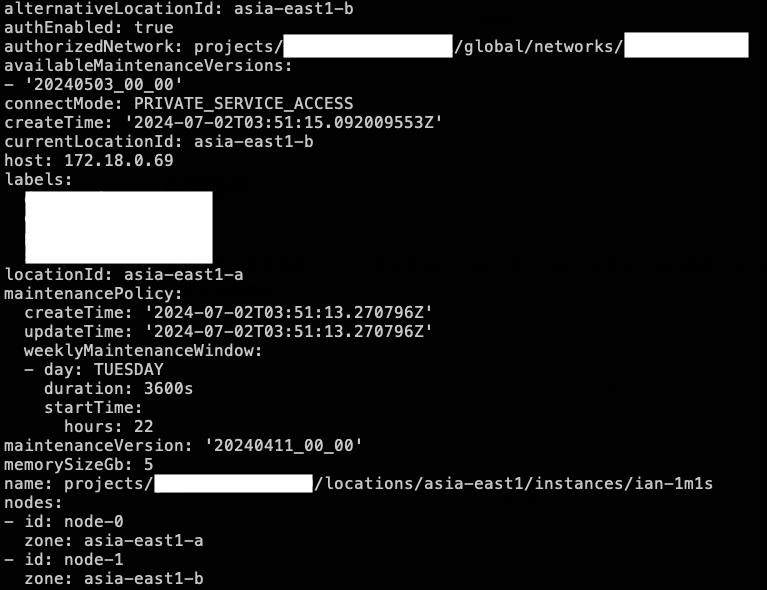
可以看到 currentLocationId 代表現在 Primary (node-0) asia-east1-a,locationId 代表最初配置 Primary 區域,alternativeLocationId 則是最初配置 Replica 的區域,因此我們也可以在故障轉移後,來查看區域是否變化。詳細可以參考:gcloud verification
接著我們可以參考 Initiate a manual failover 文章,手動來觸發 failover,這邊提醒一下 手動 failover 有分兩種資料保護模式:limited-data-loss、force-data-loss,詳細請看 Optional data protection mode,這邊測試就不討論兩種保護模式,都使用預設的 limited-data-loss 來測試。
寫 shell 測試 redis 連線
另外,我們在寫一個 shell 到 GKE 裡面 (用同 VPC 打) 打 Memorystore Redis 的 Primary Endpoint 以及 Read Endpoint,看看當 failover 是不是會有連不上的問題 ~
apiVersion: v1
kind: Pod
metadata:
  name: redis-test
  namespace: default
spec:
  initContainers:
    - name: copy-scripts
      image: busybox
      command:
        [
          "sh",
          "-c",
          "cp /config/redis.sh /scripts/ && chmod +x /scripts/redis.sh",
        ]
      volumeMounts:
        - name: config-volume
          mountPath: /config
        - name: scripts
          mountPath: /scripts
  containers:
    - name: redis-cli
      image: redis:alpine
      command: ["sh", "-c", "while true; do /scripts/redis.sh; sleep 1; done"]
      env:
        - name: READ_PRIMARY_HOST
          value: "172.18.0.69"
        - name: READ_REPLICA_HOST
          value: "172.18.0.68"
        - name: REDIS_PASSWORD
          value: "XXXX"
      volumeMounts:
        - name: scripts
          mountPath: /scripts
      workingDir: /scripts
  volumes:
    - name: config-volume
      configMap:
        name: redis-scripts
    - name: scripts
      emptyDir: {}
---
apiVersion: v1
kind: ConfigMap
metadata:
  name: redis-scripts
  namespace: default
data:
  redis.sh: |
    #!/bin/sh

    ## 顏色設定
    GREEN="\033[1;32m"
    RED="\033[1;31m"
    NC="\033[0m"

    READ_PRIMARY_HOST=${READ_PRIMARY_HOST}
    READ_REPLICA_HOST=${READ_REPLICA_HOST}
    READ_REPLICA_PORT=6379
    REDIS_PASSWORD=${REDIS_PASSWORD}

    while true; do
      TIMESTAMP=$(TZ="Asia/Taipei" date +"%Y-%m-%d %H:%M:%S")
      PRIMARY_OUTPUT=$(timeout 1 redis-cli -h $READ_PRIMARY_HOST -p $READ_REPLICA_PORT -a $REDIS_PASSWORD --no-auth-warning PING) 1>/dev/null
      if [ $? -eq 0 ]; then
      echo -e "[$TIMESTAMP] PRIMARY PING ${GREEN}SUCCESS${NC}:" "$PRIMARY_OUTPUT"
      else
        echo -e "[$TIMESTAMP] PRIMARY PING ${RED}FAILED${NC}"
      fi

      REPLICA_OUTPUT=$(timeout 1 redis-cli -h $READ_REPLICA_HOST -p $READ_REPLICA_PORT -a $REDIS_PASSWORD --no-auth-warning PING) 1>/dev/null
      if [ $? -eq 0 ]; then
      echo -e "[$TIMESTAMP] REPLICA PING ${GREEN}SUCCESS${NC}:" "$REPLICA_OUTPUT"
      else
        echo -e "[$TIMESTAMP] REPLICA PING ${RED}FAILED${NC}"
      fi

      sleep 1
    done
開始手動觸發 failover
我們準備好監控以及也先看好 describe 後,就可以下指令來手動觸發 failover:
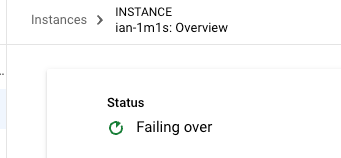
gcloud redis instances failover ian-1m1s --data-protection-mode=limited-data-loss --region=asia-east1 --project={project_id}可以看到目前 ian-1m1s 就開始 Failing over 了~
後續觀察
查看監控
首先我們先看監控部分,可以看到原本的 node-1 是 Primary 後來掉下來的同時,由 node-2 變成 Primary 最後完成故障轉移。
再來看 describe 的部分,可以發現原本的 currentLocationId 從 Primary (node-0) asia-east1-a 變成(node-1) asia-east1-b,完成故障轉移,因此更換區域。
查看腳本
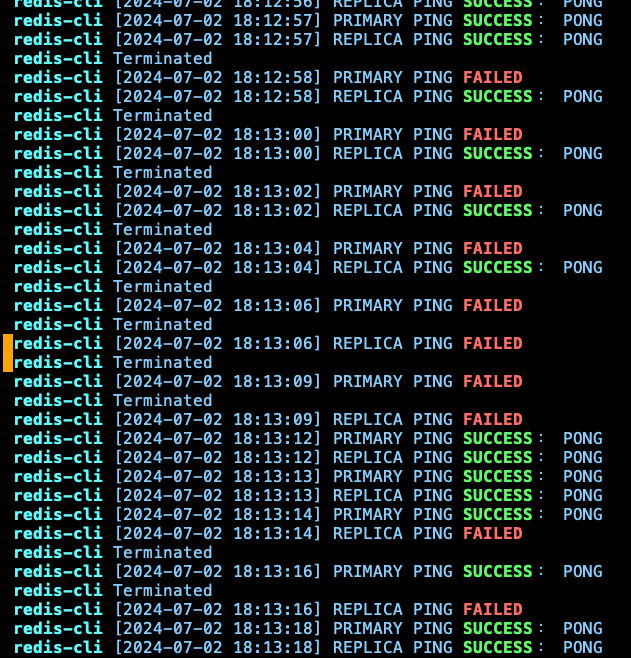
最後,查看一下腳本的執行紀錄可以發現:在 18:12:58, 出現第一筆 Primary PING 不到的錯誤,到 18:13:18 才恢復,代表故障轉移時間約 20 左右 (最後面會測試 5 次來取平均),其流程是 Primary 會先連不到,接著變成 Primary 跟 Replica 都連不到,最後剩下 Replica,到都正常。
實作測試 (1m2s)
由於設定都差不多,所以上述 1m1s 設定這邊就不重複說明,記得把 IaC 的 replica_count 改成 2,以及 shell 的 IP 跟 Password 要記得換!
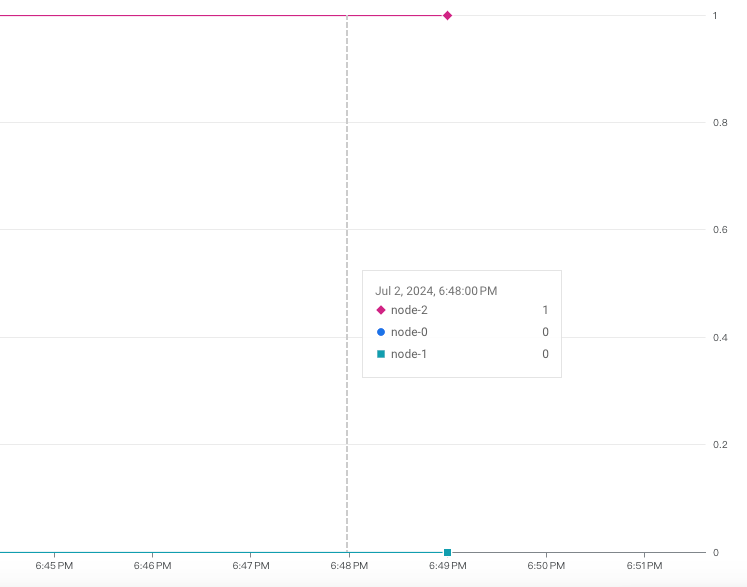
直接看監控部分:可以看到現在 node-2 是 1,代表 node-2 是 Primary,其他 node-1、node-0 都是 Replica。
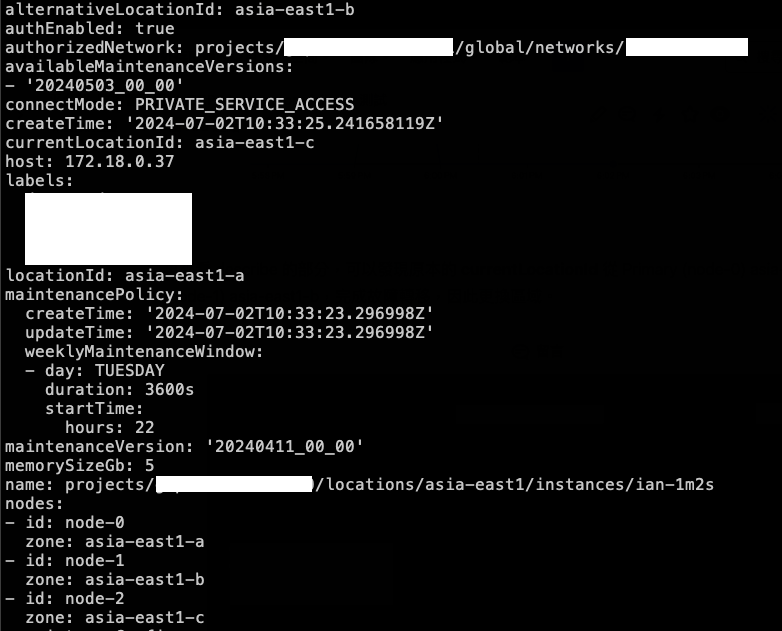
接著看 describe:currentLocationId 是 asia-east1-c,也就是 node-2 (Primary)。
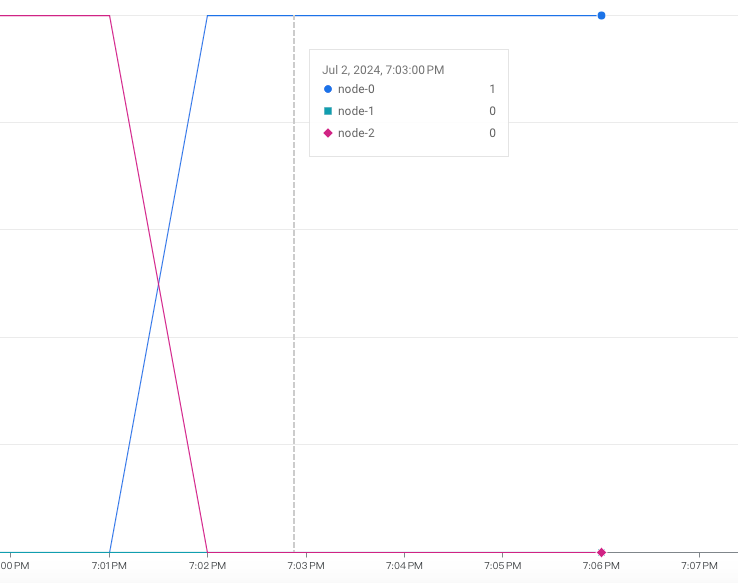
一樣下指令來跑 shell,並觀察監控、describe 來有 shell: 變成 node-0 變成 Primary,node-2 變成 Replica,node-1 一樣是 Replica。
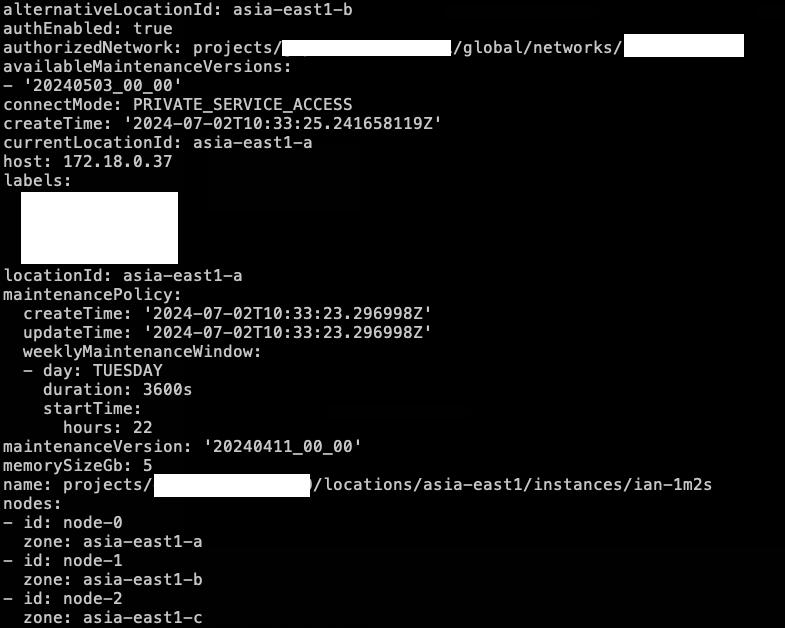
currentLocationId 變成是 asia-east1-a,Primary 從 node-2 變成 node-0。
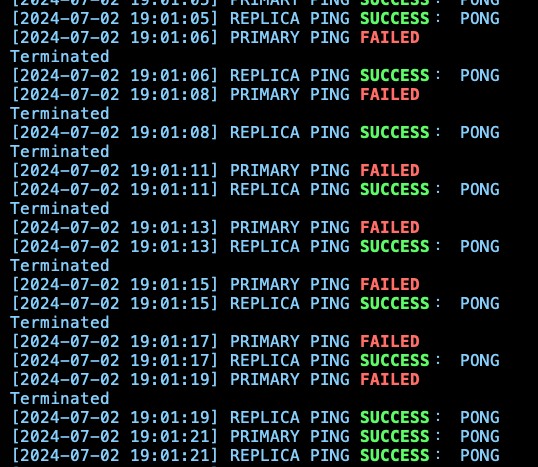
觀察 shell 發現,有出現 FAILED 都是 Primary,Replica 都正常。
整理故障轉移時間
| 測測次數 | 1m1s (秒) | 1m2s (秒) |
|---|---|---|
| #1 | 16 | 13 |
| #2 | 19 | 10 |
| #3 | 22 | 6 |
| #4 | 20 | 10 |
| #5 | 18 | 9 |
可以發現,多一個 Replica,在故障轉移的時間可以更快速。
最佳實踐
所以我們知道,每當發生 Failover 時,一定會出現斷線的問題,官方在 Memorystore for Redis 的 General best practices 中有提到需要重新連線的操作和場景,以下都會導致與 Redis instance 網路連線中斷:
Certificate Authority rotation for Redis instances that have in-transit encryption enabled
Emergency failover
所以我們需要再設計應用程式時,考量到這一點,可以參考 Exponential backoff ,要加上重試邏輯,讓應用程式自動重新連線並持續正常運作。
參考資料
Memorystore for Redis FAQ:https://cloud.google.com/memorystore/docs/redis/faq
High availability for Memorystore for Redis:https://cloud.google.com/memorystore/docs/redis/high-availability-for-memorystore-for-redis#when_a_failover_is_triggered
About manual failover:https://cloud.google.com/memorystore/docs/redis/about-manual-failover#stackdriver_verification
Initiate a manual failover:https://cloud.google.com/memorystore/docs/redis/initiate-manual-failover
General best practices:https://cloud.google.com/memorystore/docs/redis/general-best-practices
Exponential backoff:https://cloud.google.com/memorystore/docs/redis/exponential-backoff